LayerShuttle imports your XD files as native, high-fidelity Figma layers. Text stays text, vectors stay vectors — masks, gradients and blur come across. Migrate one screen or an entire project.
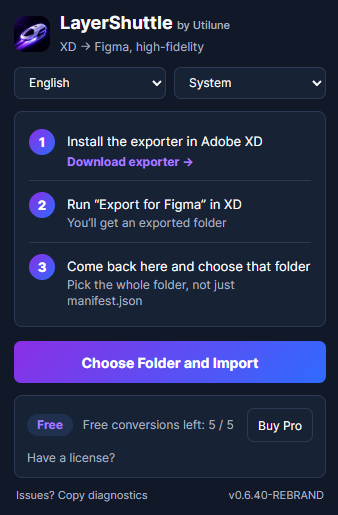
LayerShuttle is two halves that work together — you install both, once:
⚠️ The exporter on its own only creates a package — you need the LayerShuttle plugin inside Figma to turn it into a real design.
Built for real migration work, not a screenshot importer.
Native Figma text, vectors and frames — not a flat image. Keep designing right away.
Matrix-accurate geometry, rotation and positioning so layouts land where they should.
Reconstructed as real Figma effects and clips instead of being baked away.
Import a whole folder of screens in one run, each as its own page. (Lifetime plan)
Keeps your original XD font choices instead of silently swapping them.
Import runs locally in Figma. Your design files aren’t uploaded to a server.
Export from XD, choose the folder in Figma, done.
Download the free LayerShuttle exporter, drop it into Adobe XD's plugin folder, then run Export for Figma.
Download exporter (.zip)The exporter writes a self-contained package folder with your artboards and assets.
Open LayerShuttle in Figma, choose the folder, and watch it rebuild as editable layers.
Start with 5 free conversions. Upgrade when you’re ready — Lifetime is the best deal for a one-time migration.
Checkout opens at launch — download the free exporter to start now. Prices in USD · 14-day money-back guarantee · Batch folder import is exclusive to the Lifetime plan.
Yes. You export your file from Adobe XD with the free LayerShuttle exporter, then import that package into Figma with the LayerShuttle plugin. The exporter needs Adobe XD 21 or newer.
Yes. LayerShuttle rebuilds your design as native Figma layers — real text, vectors and frames — so you can keep editing. It is not a flattened image or a single screenshot.
Artboards, text, vectors and shapes, images, masks, gradients, blur effects and layer structure — placed with matrix-accurate geometry and rotation.
You get 5 free conversions, no credit card required. After that, unlock unlimited conversions with any paid plan.
Batch import lets you select a folder of exported screens and import them all in one run, each as its own Figma page. It is included with the Lifetime plan.
Yes. If LayerShuttle isn’t right for you, email us within 14 days of purchase for a full refund.
No. The import runs locally inside Figma. Your design files stay on your machine; only license validation talks to our payment provider.
Grab the free exporter and try it now. Paid plans open at launch.
Download the free exporter